Digital and Physical Solar Plant Models Compared: Understanding Design, Planning and Presentation
Digital and Physical Solar Plant Models can represent the same solar power project, but each model serves a different purpose. A digital model helps engineers and designers create, change and study a solar plant on a computer. A physical model uses the same project information to create a real three-dimensional scale representation. People can view the physical model from different sides and understand the project in a direct way.
Solar power projects are becoming larger and more detailed. A modern solar plant can include hundreds or thousands of solar panels, mounting structures, internal roads, fencing, control buildings, transformers, substations, cable routes, drainage areas and transmission connections. Because of this, a complete project can become difficult to understand from drawings alone. Digital and physical solar plant models provide two useful ways to understand the overall layout.
Both models can show the main arrangement of a solar plant. However, they provide different experiences. A digital model gives designers more flexibility because they can change the layout quickly. A physical model gives viewers a real three-dimensional view of the project. Therefore, both approaches can support design review, engineering coordination, client presentations, planning and education.
What Are Digital and Physical Solar Plant Models?
Digital and physical solar plant models are two ways to represent the same type of solar power project.
A digital model exists inside a computer-based design environment. Engineers can create the site layout, arrange solar panels and add roads, buildings, electrical equipment and other plant elements.
A physical model represents the project at a selected scale. Model makers use physical materials and miniature components to recreate important parts of the solar plant.
The main difference is the way people interact with each model. A digital model allows users to change the view and modify the design. A physical model allows people to walk around the representation and examine it from different physical positions.
Because of these differences, both models can support different stages of solar project development.
What Is a Digital Solar Plant Model?
A digital solar plant model is a three-dimensional computer-based representation of a solar power project. Designers and engineers can create the site layout inside 3D design software. They can add solar panel blocks, roads, buildings, electrical equipment and other plant elements.
Unlike a simple 2D drawing, a digital model allows users to view the project from many directions. They can rotate the site, zoom into a particular area and inspect the relationship between different components.
A digital model can represent many parts of a solar plant, including:
- Solar panel arrays
- Panel mounting structures
- Internal roads
- Site boundaries
- Security fencing
- Control rooms
- Inverter areas
- Transformer locations
- Substations
- Cable routes
- Transmission towers
- Green areas
- Drainage zones
- Service buildings
- Equipment yards
The main benefit of a digital model is flexibility. If the position of a transformer needs to change, the designer can move it without rebuilding the complete representation.
Digital Models Support Design Changes
Solar plant planning can involve many design changes. The number of panels, equipment positions, road widths, cable routes and other elements can change as the project develops.
A digital model makes these changes easier. Designers can move components and test different arrangements before construction starts.
For example, if a project team wants to move the substation to another part of the site, engineers can change its location in the digital model. They can then check the nearby roads, cable routes and equipment connections.
Similarly, designers can rearrange solar panel blocks to study how the available land is being used.
This flexibility makes digital models useful during the early and middle stages of solar plant planning.
What Is a Physical Solar Plant Model?
A physical solar plant model is a real three-dimensional scale representation of a solar power project. Instead of viewing the project only on a computer screen, people can see a miniature version of the complete plant.
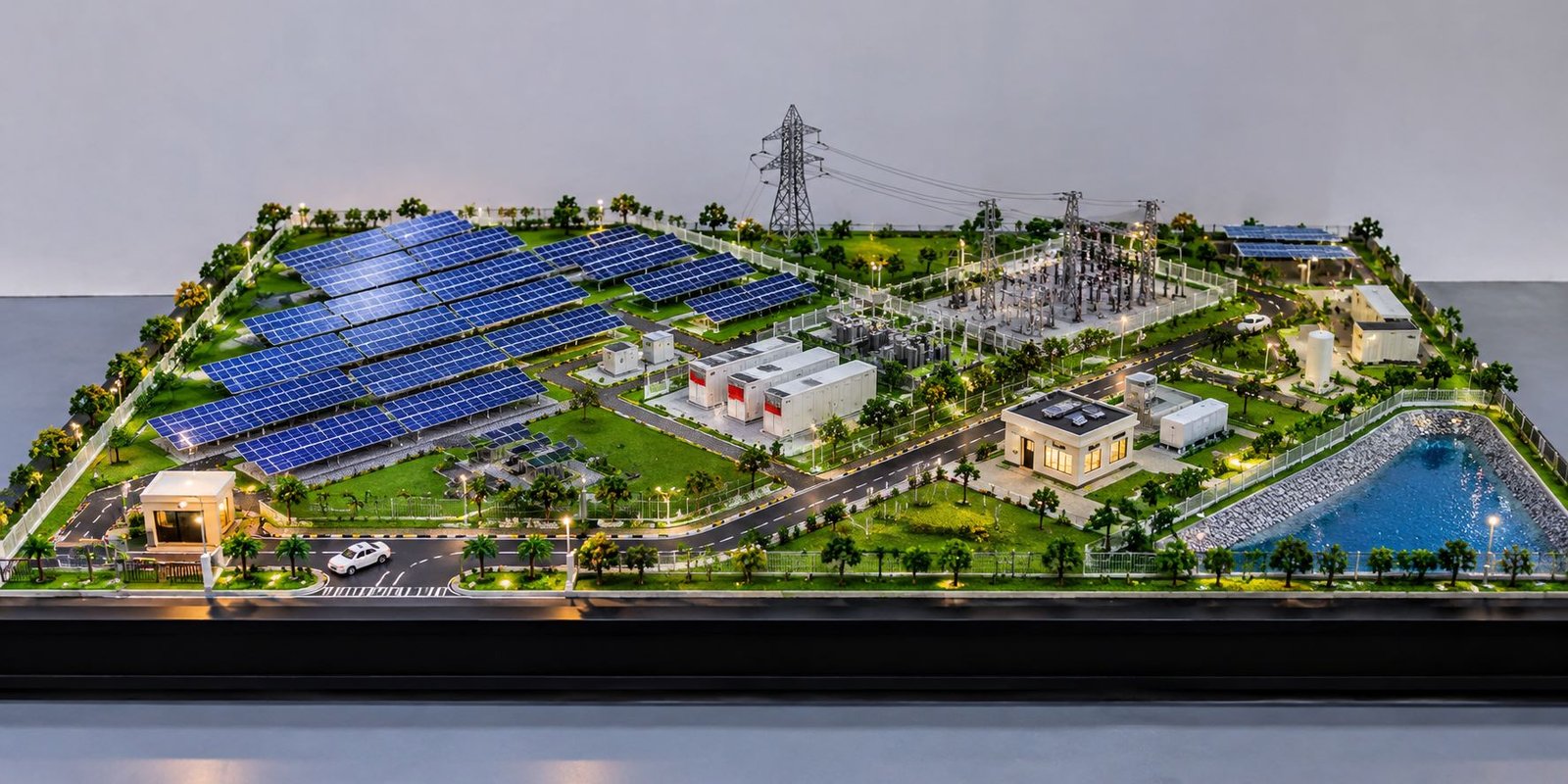
Model makers can build the project with physical materials and small-scale components. A detailed physical model can include solar panel arrays, roads, fencing, buildings, substations, transformers, transmission structures, trees, lighting and other site features.
A physical model turns technical site information into something people can see directly. This can make the overall project easier to understand during meetings and presentations.
People can stand around the model and view it from the front, rear, sides and top. They can also point to specific areas while discussing the project with other team members.
A physical model can clearly explain:
- How solar arrays occupy the site
- Where the main roads are located
- How equipment areas are separated
- Where the substation is located
- How the entrance connects to internal roads
- How the plant boundary surrounds the project
- How different zones connect with each other
Because viewers can examine the project directly, a physical model can also work as a useful presentation and communication tool.
How Digital and Physical Solar Plant Models Show the Same Project Differently
The main difference between the two models comes from the viewing experience.
A digital model appears on a computer screen. Users can change the camera angle, zoom into an area and select different views. They can also make changes when the design needs an update.
A physical model gives viewers a fixed three-dimensional representation. Instead of changing the camera with a mouse, people can walk around the model and look at it from different positions.
For example, a top view of a digital solar farm can show the complete panel arrangement clearly. However, a physical model can also help viewers understand the height relationship between solar panels, buildings, electrical equipment and transmission towers.
Therefore, both approaches have a useful role. The digital model supports flexible design work, while the physical model supports direct visual communication.
Digital Solar Plant Model for Planning and Design
Digital models work especially well when a project team still needs to make design decisions.
During early planning, engineers may want to test several plant layouts. They can create different arrangements and compare the available space.
For example, one layout may leave more space between equipment areas. Another layout may use the available land more efficiently. Designers can test both options on the computer without building a separate physical model for every alternative.
This process can save time during design development. It also gives the project team more freedom to study different options before finalizing the layout.
Testing Different Plant Layouts
A solar plant contains much more than solar panels. The site also needs access roads, electrical equipment, maintenance areas and other supporting infrastructure.
A digital model helps designers understand how these elements fit together.
For example, a road may pass too close to a building. The designer can move the road and check the new arrangement. An equipment area may block an access route. In that case, the team can move the equipment and review the layout again.
Unused land can also become easier to identify. Designers can adjust the solar panel blocks and study how the new arrangement uses the available space.
As a result, the digital model becomes part of the design process instead of serving only as a final presentation.
Viewing the Solar Plant From Different Angles
Another useful feature of a digital model is camera control.
Designers can view the solar plant from:
- Top view
- Front view
- Rear view
- Side view
- Isometric view
- Close-up view
- Aerial-style view
Each view can help answer a different project question.
For example, an aerial view can show the complete plant layout. A close-up view can focus on the substation, transformer yard or a particular solar panel block.
This makes digital models useful for design reviews and detailed project discussions.
Physical Solar Plant Model for Visual Communication
A physical solar plant model can help explain a project to people who do not work with engineering drawings every day.
Technical drawings contain important information, but some viewers may find it difficult to understand the complete three-dimensional arrangement from lines, symbols and dimensions alone.
A physical model makes this process more direct.
Viewers can see the overall shape and organization of the project. Roads look like roads, solar panels appear as miniature panel blocks and buildings have a clear three-dimensional form.
Because of this, physical solar plant models can support client meetings, exhibitions, project presentations and planning discussions.
How Digital and Physical Models Create Different Visual Experiences
A physical model gives people the opportunity to walk around the project.
This becomes useful when a solar plant has many areas that connect with each other. A single drawing may not show these relationships clearly to every viewer.
For example, people can look at the distance between solar panel blocks and the substation. They can also see how the internal road network connects equipment areas and how the boundary surrounds the plant.
As a result, the physical model gives viewers a direct understanding of the project arrangement.
Difference Between Digital and Physical Solar Plant Models
Digital and physical models can represent the same solar plant, but their practical uses are different.
Flexibility of Digital and Physical Models
Digital models provide high flexibility. Engineers can move components, change sizes and update the layout without rebuilding the complete model.
Physical models do not offer the same level of flexibility after production. A major layout change may require the model maker to modify or rebuild some parts.
For this reason, digital models work well during design development. Physical models work well when the project reaches a stable stage and needs a clear presentation format.
Viewing Experience of Digital and Physical Models
A digital model needs a computer, monitor or other display. Users can change the camera and zoom into specific areas.
A physical model gives viewers a real three-dimensional object. They can move around it and observe the project from different physical positions.
This difference can change the way teams discuss a project during meetings.
Modification of Digital and Physical Models
Changing a solar panel arrangement in a digital model can take relatively little time.
A physical model presents a different situation. If the model contains hundreds of miniature solar panels, changing their positions may require additional fabrication work.
Therefore, teams often use physical models when the main layout has already reached a stable stage.
Presentation With Digital and Physical Models
Digital models work well for:
- Design presentations
- Digital meetings
- Animations
- Design reviews
- Remote communication
- Project reports
Physical models work well for:
- Boardroom presentations
- Exhibitions
- Office displays
- Visitor centers
- Project displays
- Client meetings
Both formats can support different communication needs.
How a Digital Model Can Improve a Physical Model
Digital and physical models do not need to work as separate systems. A digital model can provide the information needed to build a physical presentation model.
The digital layout can define the location of solar panel blocks, buildings, roads, equipment and other major elements. After the project team approves the layout, model makers can use this information to create physical miniature components.
This creates a useful connection between digital design and physical model making.
For example, the digital model can establish the complete solar plant layout first. After approval, the model maker can reproduce the important project elements at the required scale.
This approach can reduce unnecessary changes during physical model production.
Solar Panel Arrays in Digital and Physical Models
Solar panels form the main visual element of most solar plant models.
In a digital model, designers can show thousands of panels as organized arrays. They can arrange the rows and blocks according to the actual project layout.
The digital model can show the complete solar field from above. At the same time, designers can create close-up views to show individual panel sections.
A physical model creates a different visual effect. Hundreds of miniature panels arranged across a base can immediately show the scale and density of the solar farm.
Depending on the selected scale, the model can also show the mounting structures below the panels.
Therefore, the same solar panel layout can provide two different ways to understand the project.
Substation and Electrical Equipment in Digital and Physical Models
The electrical section of a solar plant also needs clear representation.
A typical project can include transformers, switchgear, control buildings, busbars and other electrical equipment.
In a digital model, engineers can create these components as three-dimensional objects. They can then inspect their location and relationship with other plant areas.
Physical models can use miniature transformers, electrical structures and substation equipment inside a dedicated equipment area.
This helps viewers understand that a solar plant involves more than solar panels. The complete model can show the movement from the solar generation area toward the electrical infrastructure.
Roads, Access and Site Movement in Digital and Physical Models
Internal roads play an important role in solar plant planning.
Maintenance teams need access to different sections of the site. Equipment installation and service work also require suitable access routes.
A digital model can show the complete road network. Designers can study how roads connect with solar panel blocks, buildings and equipment areas.
A physical model makes these relationships easier to see.
Model makers can include road markings, turning areas, entrances and intersections. When these roads appear alongside solar arrays and buildings, viewers can understand the overall site organization more easily.
Fencing and Site Boundaries
A solar plant normally covers a defined site area. Therefore, the model can include the site boundary and fencing.
In a digital model, designers can show the boundary as a line, fence object or other site element.
In a physical model, miniature fencing can create a clear separation between the solar plant and the surrounding area.
This detail also helps viewers understand the overall size and extent of the project.
Lighting in Physical Solar Plant Models
Lighting can add another visual feature to a physical solar plant model.
Model makers can install small LED lights around roads, buildings or selected plant areas. These lights can make the model more attractive during presentations and exhibitions.
Lighting can also highlight important areas.
For example, lights can draw attention to the main entrance, control building, substation and internal roads.
However, the lighting should support the model rather than hide its engineering details. The main purpose should remain the clear representation of the solar plant layout.
Why Physical Models Are Useful for Client Presentations
A client may understand technical drawings, but a physical model can provide a quick overview of the complete project.
During a meeting, people can stand around the model and discuss different areas. One person can point toward the main entrance while another person can discuss the substation location.
Everyone can look at the same three-dimensional representation while discussing the project. This can make the conversation more visual and easier to follow.
The approach can become especially useful when several departments take part in the same project discussion.
Useful for Management and Non-Technical Viewers
Senior management, investors, visitors and other non-technical stakeholders may not need every engineering detail.
Instead, they may want to understand:
- Overall plant size
- Panel arrangement
- Site organization
- Main infrastructure
- Equipment zones
- Access roads
- Project boundaries
- General appearance
A physical solar plant model can communicate these points quickly. It gives viewers a common reference that they can understand without studying a complete set of technical drawings.
Why Digital Models Remain Important
Even after a physical model reaches the presentation stage, the digital model can remain useful.
A physical model represents one version of the project. The engineering team may continue to change the design after that version is complete.
The digital model can remain the main working version while the physical model supports presentations and visual communication.
This creates a useful combination. Engineers can continue developing the digital project, while clients and other stakeholders can use the physical model to understand the overall design.
Using Digital and Physical Models Together
Instead of choosing only one model type, project teams can use digital and physical models together.
The process can start with digital planning. Designers create the solar plant in a three-dimensional environment and arrange the panel blocks, roads, buildings, electrical equipment and site boundaries.
Next, the project team reviews the digital layout and makes the required changes.
After the team approves the design, the important information can move into physical model production.
The physical model can then support client presentations, exhibitions, office displays and project discussions.
Meanwhile, the digital model remains available for future design work.
This combined approach provides both design flexibility and physical communication.
Combined Digital and Physical Solar Plant Workflow
Digital Planning
↓
3D Solar Plant Layout
↓
Design Review
↓
Layout Modification
↓
Approved Design
↓
Physical Model Production
↓
Client Presentation / Exhibition / Display
↓
Further Digital Development
Applications of Digital and Physical Solar Plant Models
Digital and physical solar plant models can support many project activities.
Solar Farm Planning
Large solar farms can use digital models to study site organization and test different layouts. Physical models can then present the proposed development in a clear three-dimensional format.
Engineering Coordination
Digital models can help different engineering teams understand the relationship between solar arrays, roads, electrical equipment and other plant components.
EPC Project Presentation
Engineering, procurement and construction teams can use physical models to explain the project scope and overall plant arrangement during meetings.
Investor and Client Meetings
A physical model can provide a quick visual overview of a proposed solar project. It can also give clients a simple way to discuss specific areas of the site.
Educational Projects
Engineering students can use physical solar plant models to learn about solar generation, electrical infrastructure and plant layout.
A model can show these elements together instead of presenting them as separate drawings.
Exhibitions
A detailed physical solar plant model can attract attention at exhibitions. Visitors can understand the basic project arrangement without studying complex technical drawings.
Project Documentation
Digital views can support presentations, reports and technical communication. At the same time, physical models can provide permanent displays for offices, visitor centers and other project spaces.
Choosing the Right Level of Detail for Digital and Physical Models
Every solar plant model does not need the same level of detail.
A digital engineering model may include a large amount of technical information. In contrast, a physical presentation model may focus on the most important visual elements.
The selected scale also affects the level of detail.
For example, a smaller physical model may show solar arrays as repeated groups of panels. A larger model can show individual mounting structures, electrical equipment, roads and smaller site details.
Therefore, the model should match its purpose, viewing distance and presentation requirements.
Detail Should Match the Purpose
If the model will support an engineering discussion, the team may need more technical details.
On the other hand, a model designed for a client presentation may focus more on the overall site layout and major project elements.
Similarly, an exhibition model may need strong visual details that help visitors understand the project quickly.
The right balance depends on how and where people will use the model.
The Future of Digital and Physical Solar Plant Visualization
Solar power projects are becoming more complex, so clear visualization will continue to play an important role.
Digital models can become more detailed and interactive. They can help teams study design changes, review layouts and coordinate different project elements.
Physical models also remain useful because they offer something that a computer screen cannot fully provide: a real object that people can observe from all sides.
For this reason, digital and physical models can continue to work together. The digital model offers flexibility, while the physical model provides a tangible way to understand the project.
Conclusion: Digital and Physical Solar Plant Models
Digital and Physical Solar Plant Models provide two different ways to understand the same renewable energy project.
A digital model gives engineers flexibility. They can change layouts, move equipment, test different arrangements and view the project from many angles. This makes digital models useful during planning and design development.
A physical model gives viewers a real three-dimensional representation. People can stand around the model, observe the solar arrays, follow the roads and understand the location of buildings, substations, transformers and other equipment.
The main difference is not simply that one model exists on a computer and the other exists physically. The real difference comes from the way each model supports the project.
Digital models work well when the design is still changing. Physical models become especially useful when the project needs a clear presentation, display or visual explanation.
A detailed physical solar plant model can show solar panel arrays, roads, fencing, buildings, substations, transformers, transmission structures, landscaping and other major project elements together on one base. At the same time, the digital model can remain available for design updates and future development.
Therefore, using both model types together can create a complete visualization process. The digital model can support early planning and design, while the physical model can support client meetings, exhibitions, presentations and project communication.
For large solar projects, this combination can make complex information easier to understand and give different stakeholders a clearer view of how the complete solar plant fits together.